Part of High performance browser networking - Browser APIs and Protocols
XMLHttpRequest(XHR)
- XMLHttpRequest (XHR) is a browser-level API that enables the client to script data transfers via JavaScript.
- Prior to XHR, the web page had to be refreshed to send or fetch any state updates between the client and server. With XHR, this workflow could be done asynchronously and under full control of the application JavaScript code.
- XHR is an application API provided by the browser, the browser automatically takes care of all the low-level connection management, catching, redirects, protocol negotiation, formatting of HTTP requests, authentication and much more.
- Cross-Origin Resource Sharing (CORS)
- The browser will refuse to override any of the unsafe headers, which guarantees that the application cannot impersonate a fake user-agent, user, or the origin from where the request is being made.
- same-origin policy
- An “origin” is defined as a triple of application protocol, domain name, and port number—e.g., (http, example.com, 80)
- CORS provides a secure opt-in mechanism for client-side cross-origin requests
- The opt-in authentication mechanism for the CORS request is handled at a lower layer:
- when the request is made, the browser automatically appends the protected Origin HTTP header, which advertises the origin from where the request is being made. 浏览器会自动在请求中加 Origin
- In turn, the remote server is then able to examine the Origin header and decide if it should allow the request by returning an Access-Control-Allow-Origin header in its response.
- Alternatively, if it wanted to disallow access, it could simply omit the Access-Control-Allow-Origin header, and the client’s browser would automatically fail the sent request. 如果服务器不返回这个 header,浏览器直接拦截响应(JS 拿不到数据)(网络请求其实已经成功,只是浏览器阻止 JS 读取结果)
- additional security precautions
- CORS requests omit user credentials such as cookies and HTTP authentication. 跨域请求默认不会携带 Cookie, HTTP Authentication, Client certificates
- The client is limited to issuing “simple cross-origin requests” — 不触发预检 (preflight)的请求:
- methods 仅限于:GET, POST, HEAD
- Content-Type 仅限: application/x-www-form-urlencoded, multipart/form-data, text/plain
- 只能使用安全 header: access to HTTP headers that can be sent and read by the XHR.
- Simple request 下:To enable cookies and HTTP authentication, the client must set an extra property (
withCredentials) on the XHR object when making the request, and the server must also respond with an appropriate header (Access-Control-Allow-Credentials) to indicate that it is knowingly allowing the application to include private user data (此时 Access-Control-Allow-Origin 不能是 *)
- 预检请求 preflight request
- 如果使用 PUT / DELETE, 或使用 application/json,或添加自定义 header(如 Authorization),浏览器会先自动发一个 preflight request to ask for permission
- once a preflight request is made, it can be cached by the client to avoid the same verification on each request.
- 服务器允许,浏览器才会发真正的 PUT 请求
- 如果使用 PUT / DELETE, 或使用 application/json,或添加自定义 header(如 Authorization),浏览器会先自动发一个 preflight request to ask for permission
// preflight request
OPTIONS /resource
Origin: https://app.example.com
Access-Control-Request-Method: PUT
Access-Control-Request-Headers: Authorization

// 服务器返回
Access-Control-Allow-Origin: https://app.example.com
Access-Control-Allow-Methods: GET, POST, PUT
Access-Control-Allow-Headers: Authorization
Access-Control-Allow-Credentials: true
- Downloading Data with XHR
- the browser offers automatic encoding and decoding for a variety of native data types:
- ArrayBuffer: Fixed-length binary data buffer
- Blob: Binary large object of immutable data
- Document: Parsed HTML or XML document
- JSON: JavaScript object representing a simple data structure
- Text
- Either the browser can rely on the HTTP content-type negotiation to infer the appropriate data type (e.g., decode an application/json response into a JSON object), or the application can explicitly override the data type when initiating the XHR request
- 浏览器自动编解码发生请求发送前(Request serialization)和响应返回后(Response deserialization)
- HTTP 传输的永远是字节序列(byte sequence),HTTP body 是字节
- 响应解码
- 浏览器会根据 Content-Encoding (gzip 解压)和 Content-Type 进行解码(例如 Content-Type: image/png 时不会解码,json/text 会 UTF-8 → JavaScript 字符串)
- 调用的 API 决定如何解析,例如调用 res.json(): Text (内部 byte stream)→ JSON.parse → JS Object, res.blob(): byte stream → Blob
- 请求编码
- 例如发送 JSON 时,手动做了JSON.stringify(data), JS Object → JSON string,浏览器自动:string → UTF-8 bytes
- 在 Chromium 中:
- 网络层负责解压,Blink 负责字符解码, Fetch API 决定如何暴露数据,JS 引擎负责 JSON.parse
- the browser offers automatic encoding and decoding for a variety of native data types:
- Uploading data with XHR
- The XHR send() method accepts one of
DOMString,Document,FormData,Blob,File, orArrayBufferobjects, automatically performs the appropriate encoding, sets the appropriate HTTP content-type, and dispatches the request. - send a binary blob or upload a file provided by the user: grab a reference to the object and pass it to XHR. can also split a large file into smaller chunks
- The XHR send() method accepts one of
- Streaming data with XHR
- today there is no simple, efficient, cross-browser API for XHR streaming:
- The send method expects the full payload in case of uploads.
- The response, responseText, and responseXML attributes are not designed for streaming.
- today there is no simple, efficient, cross-browser API for XHR streaming:
- XHR vs Fetch api
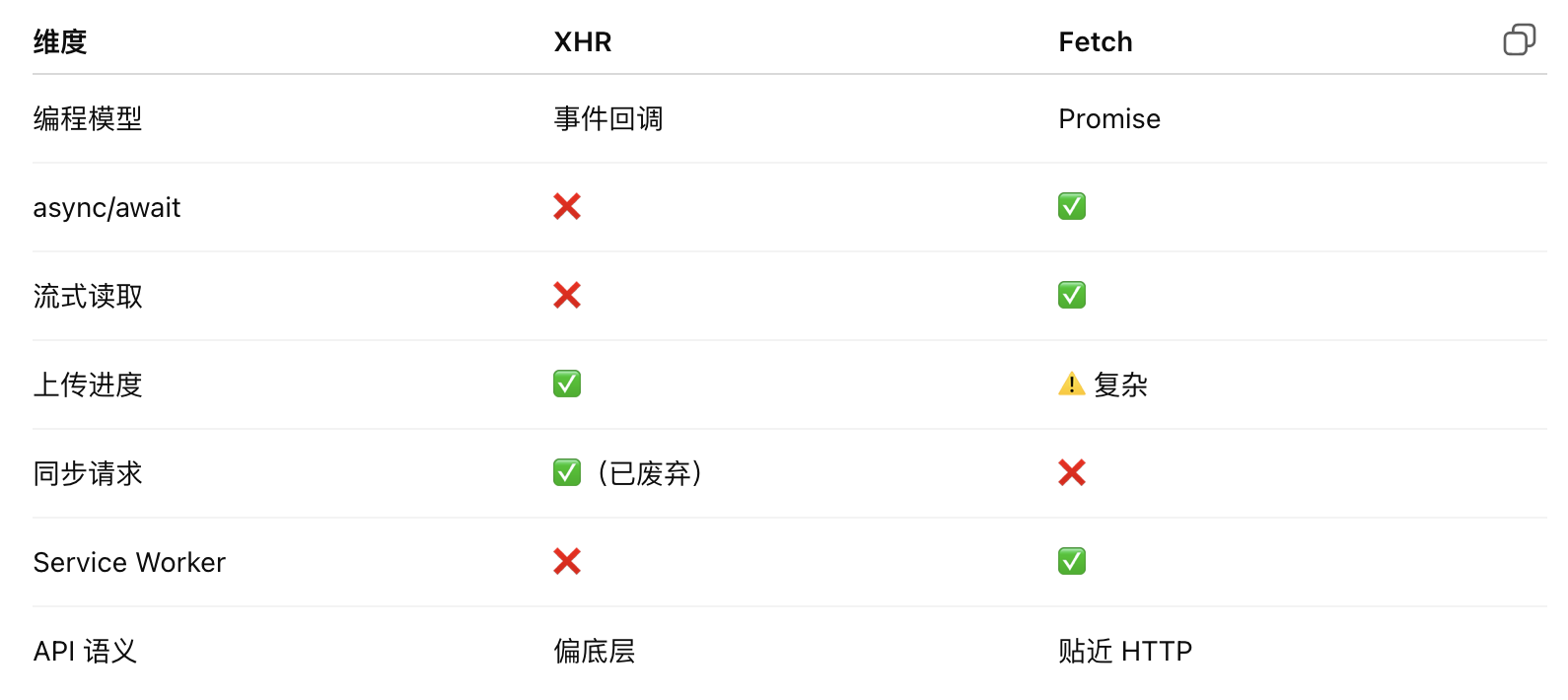
- fetch 进行上传 & 更容易并发控制 & 更容易 abort
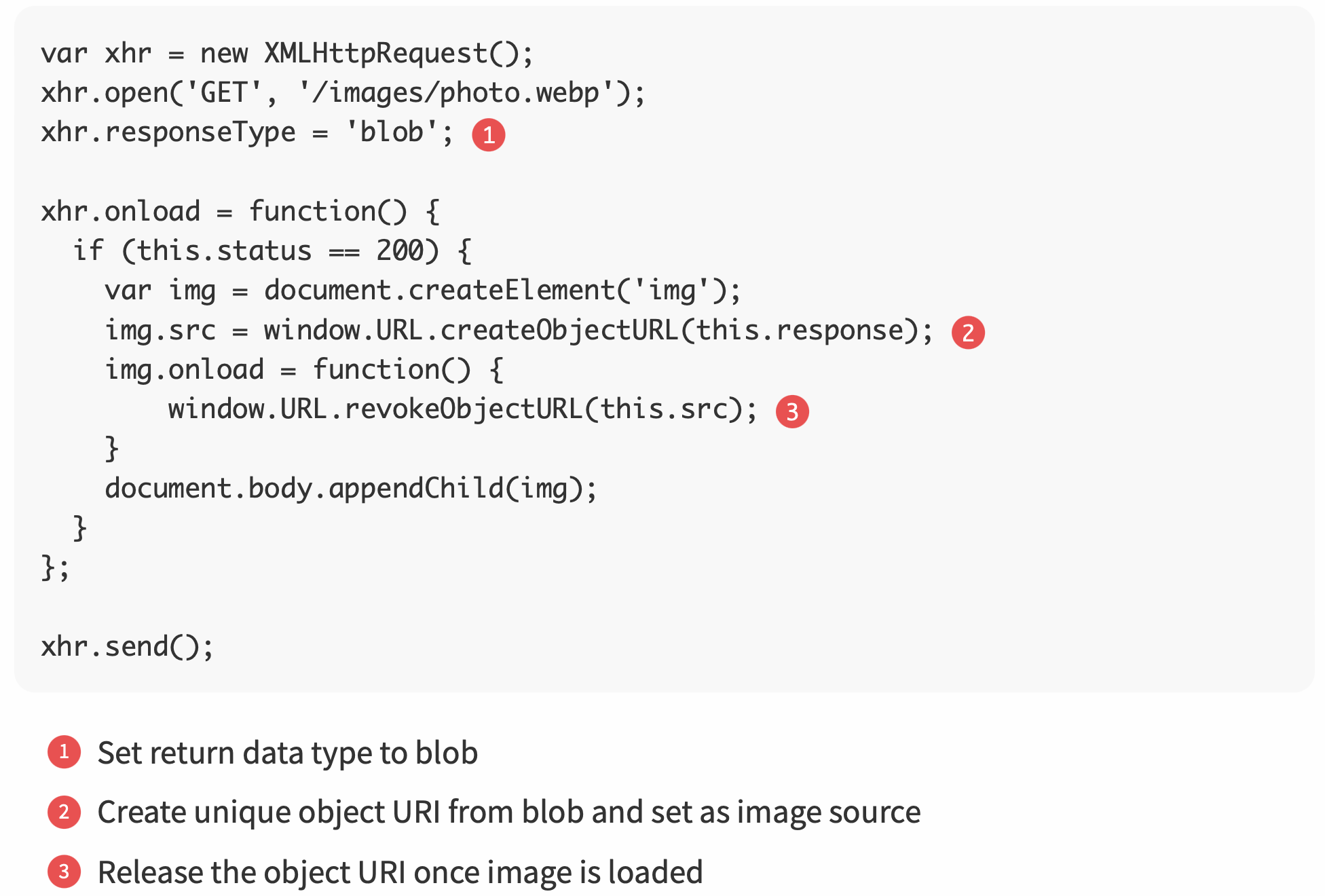
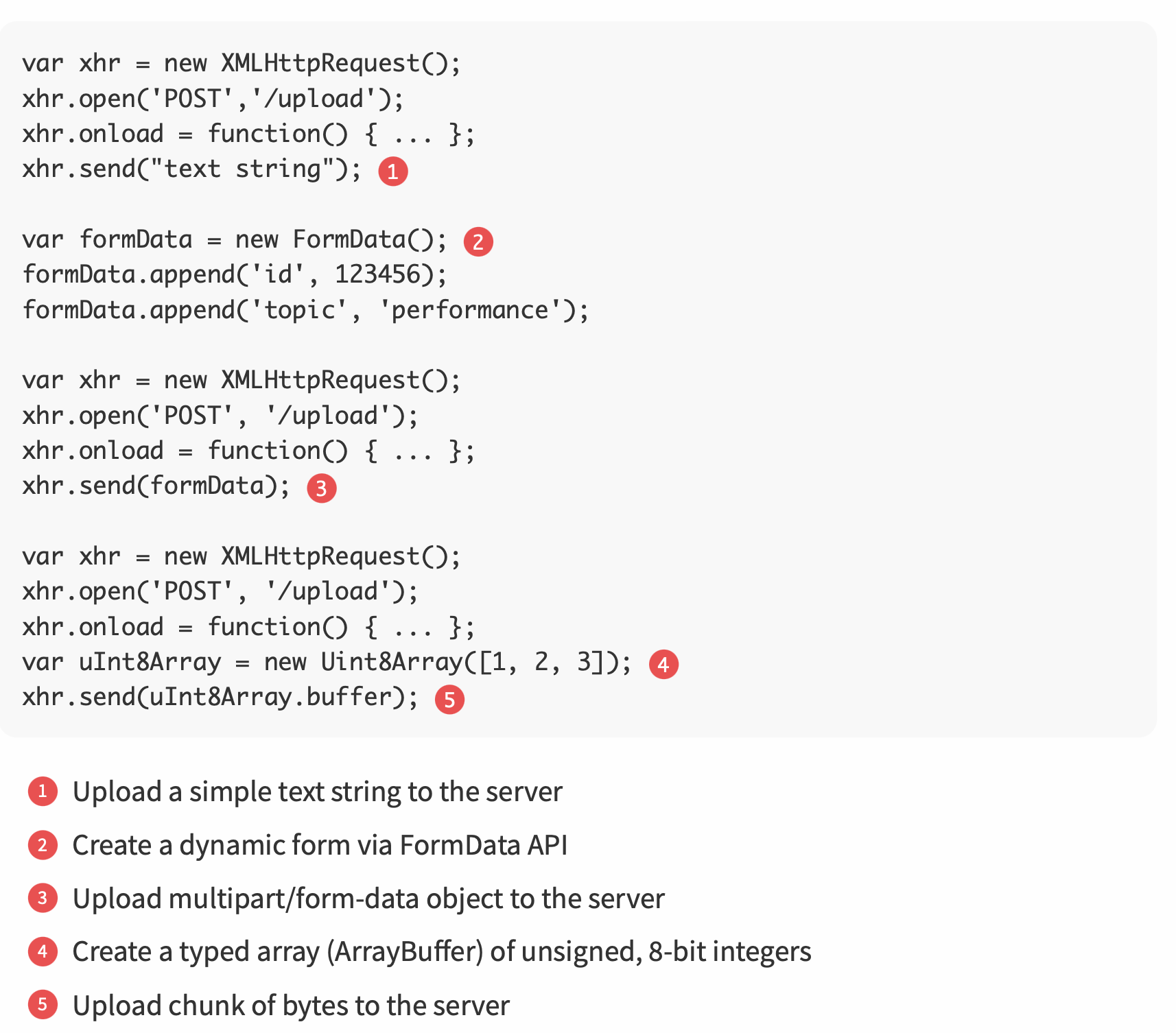
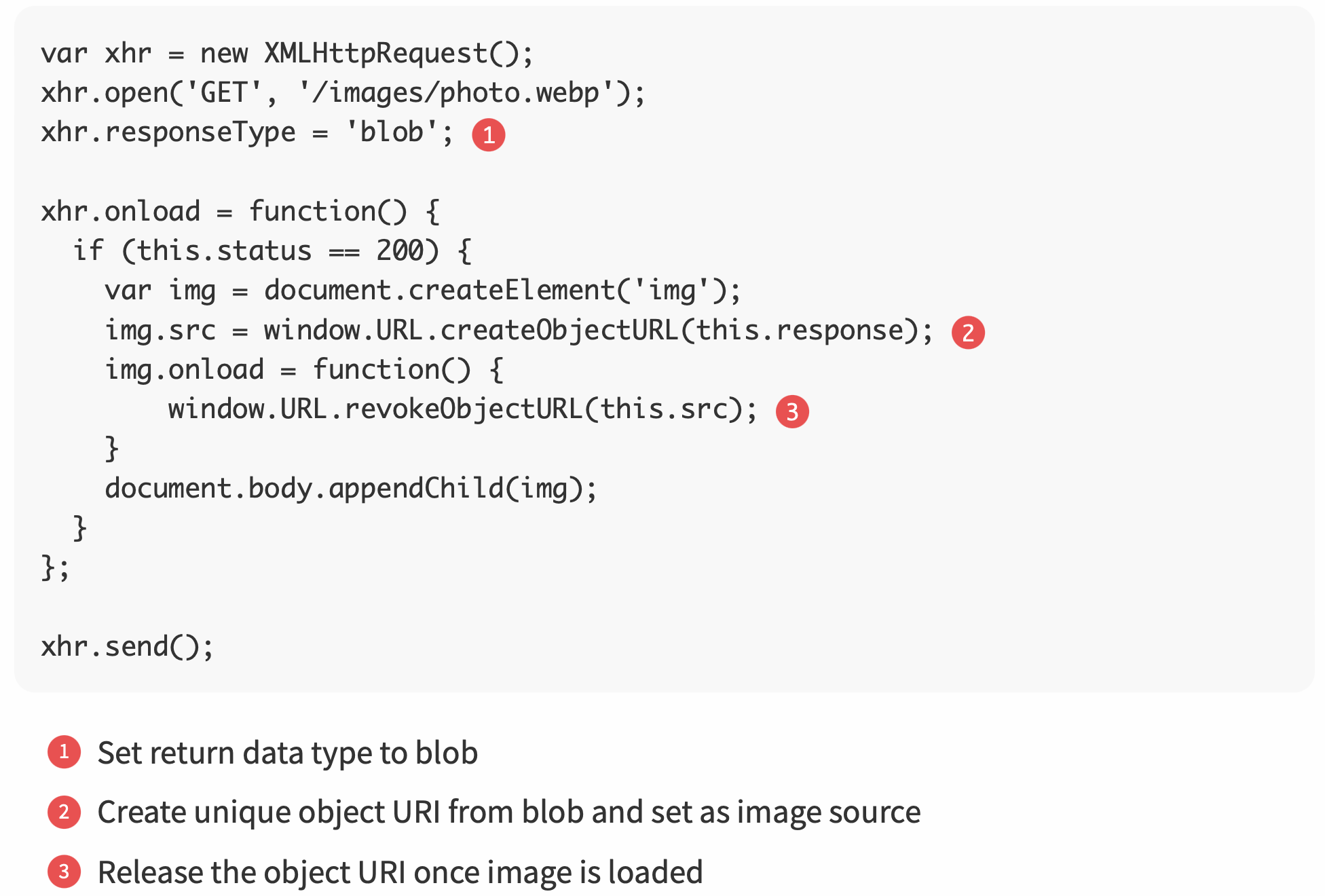

// 用 blob slice
for (let start = 0; start < SIZE; start += BYTES_PER_CHUNK) {
  const end = Math.min(start + BYTES_PER_CHUNK, SIZE);

  await fetch('/upload', {
    method: 'POST',
    headers: {
      'Content-Range': `${start}-${end}/${SIZE}`
    },
    body: blob.slice(start, end)
  });
}

// fetch 实现上传可以做真正的流式上传
const stream = new ReadableStream({
  start(controller) {
    controller.enqueue(chunk);
    controller.close();
  }
});

await fetch('/upload', {
  method: 'POST',
  body: stream,
  headers: { 'Content-Type': 'application/octet-stream' }
});
- Real-Time Notifications and Delivery
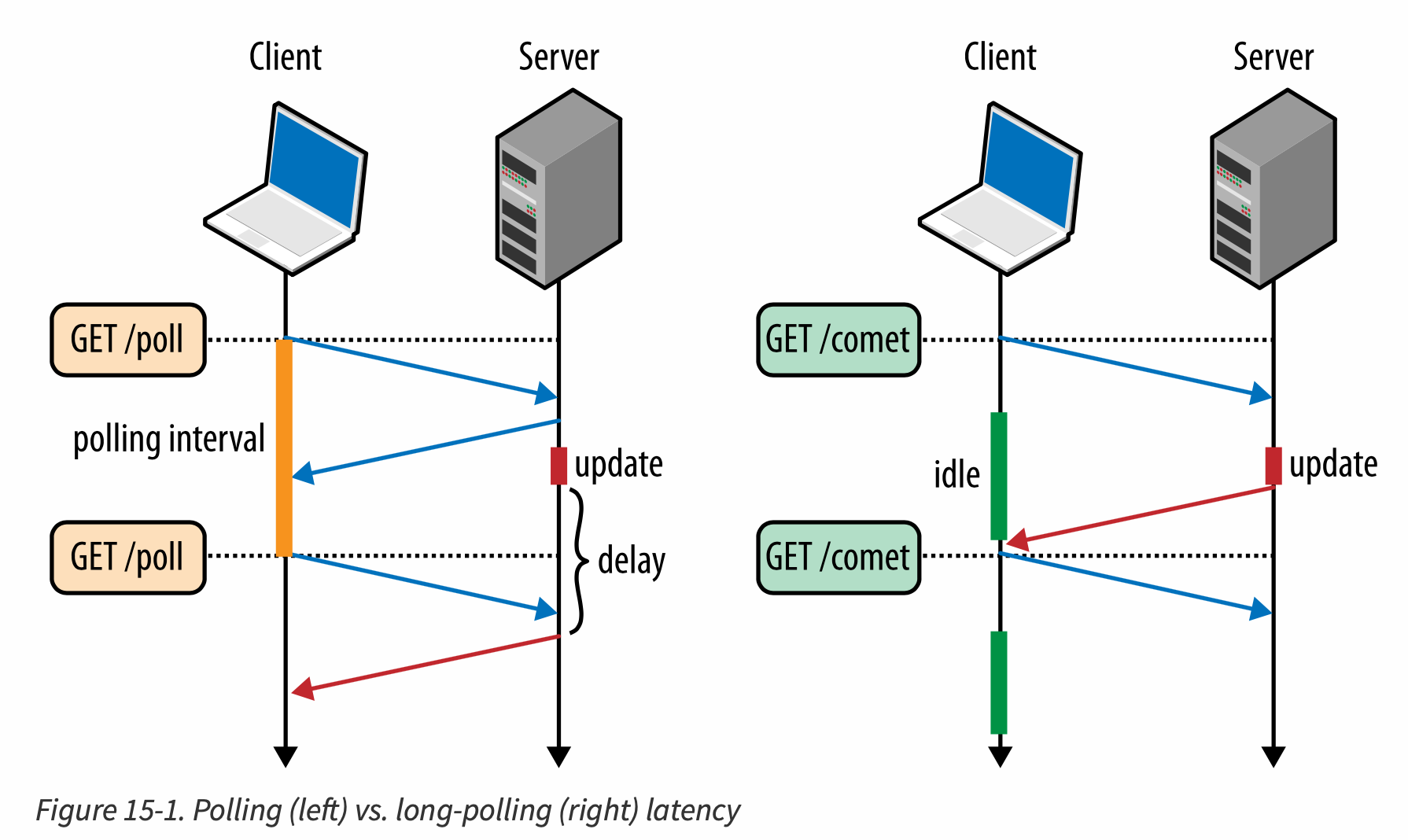
- HTTP does not provide any way for the server to initiate a new connection to the client. As a result, to receive real-time notifications, the client must either poll the server for updates or leverage a streaming transport to allow the server to push new notifications as they become available.
- 由于 XHR 原生不支持 streaming,因此主要用 poll
- Each XHR request is a standalone HTTP request, and on average, HTTP incurs ~800 bytes of overhead (without HTTP cookies) for request/response headers.
- polling is a good fit for applications where polling intervals are long, new events are arriving at a predictable rate, and the transferred payloads are large. This combination offsets the extra HTTP overhead and minimizes message delivery delays.(polling 适合: 轮询间隔长;事件到达速率可预测;单次传输 payload 较大)
- 由于每次请求都有 固定协议开销(protocol overhead),那么 HTTP 头部 + TLS 握手成本巨大;服务器压力大;大量空响应(没数据)
- 数据越大,HTTP overhead 越不重要
- 开销比例小;延迟 ≈ T/2 可接受 — Polling 是合理的。
- Long-Polling with XHR
- server holds the connection open until an update is available — Comet
- 现在已经不常用了,用 sse / web socket 等替代
- fetch streaming